





Region Meshes is a new RIPE Atlas tool that visualises intra-region routing paths, showing where traffic stays local, where it leaves, and how IXPs are being used.
Region Meshes is a new use case in RIPE Atlas that analyses intra-region routing paths to help network operators and researchers understand IXP utilisation and traffic patterns within a country or region. It answers an important question: how much of the visible traffic paths stay local in the same country or region?
This work builds on the foundation of IXP Country Jedi - originally developed by Emile Aben here at the RIPE NCC - which explored country-level IXP interconnection using RIPE Atlas traceroute data. Region Meshes extends this concept with richer visualisations, broader geographic coverage, and deeper path analysis.
In most practical cases a "region" is really a country. But for our tool it can also be a collection of countries, as long as that has an agreed-on definition and a reasonable set of probes in it. At the moment, besides all the countries we have probes in, we also have "Africa" as a region (both for demonstration and practical purposes). Note that for a multi-country region, the traffic paths visible to RIPE Atlas explicitly between those countries are also discovered.
Where does the data come from?
All the measurement data used for this use case is collected by RIPE Atlas. At the beginning of each month, we do a new round of measurements. For each country, we select all the public probes and execute a full traceroute mesh measurement between these, meaning each probe is scheduled to traceroute towards each other probe. (Given the way the system operates, these are really one-off measurements targeting a particular probe, involving each other probe in that country.) All of these measurements are tagged for convenience and easy retrieval of results.
Then, we select the 50 most diverse probes in each country, and in the further steps we only look at these - both in terms of sources and targets of measurements. The benefit here is that, if someone would like to look at results from other probes, they only need to filter the results differently, there’s no need to measure again.
In the next step, we annotate all the relevant results (meaning each IP at each hop for each traceroute in this selection) with the following meta-data:
- ASN information
- DNS name
- Whether it is associated with a known IXP
- Geolocation information provided by various geolocation providers and other sources
Finally, we massage the results into an output format that can be efficiently visualised. We also publish the meta-data that accompanies the results: what measurements were used, what results are relevant to the visualisation, and what IP metadata we found. You can find all of these in the archives.
Getting started with the visualisation
To begin exploring, you select a month, a country or region, and an address family (IPv4 or IPv6) from the controls at the top of the page. Then click Load Data. The tool will load a precomputed dataset for that combination and present the results across three visualisation tabs: Grid, Map, and Flow.

Datasets have been generated monthly since February 2026 for a curated selection of countries and regions. Each dataset is a snapshot of selected RIPE Atlas measurements for that month, analysed for IXP usage, path domesticity, and hop-level geolocation.
We can expand coverage over time, so if there's a region you'd like to see included, please let us know.
Features and visualisations
Region Meshes provides three complementary views of the same underlying traceroute data:
Grid view
A source-to-destination matrix where each cell represents a traceroute path between two RIPE Atlas probes. Cells are colour-coded by path category, giving an immediate overview of routing quality across the entire mesh. Hovering or clicking any cell reveals the full traceroute with hop-by-hop details including IP addresses, ASNs, RTT values, and IXP detection.

Map view
A geographic visualisation showing probe locations and the routing paths between them drawn as arcs on the map. Paths are colour-coded by category, and IXP locations are marked as interactive nodes. Selecting a single path zooms to show the route in detail with labels at each waypoint. Overlapping paths can be disambiguated via a selection menu.

Flow view
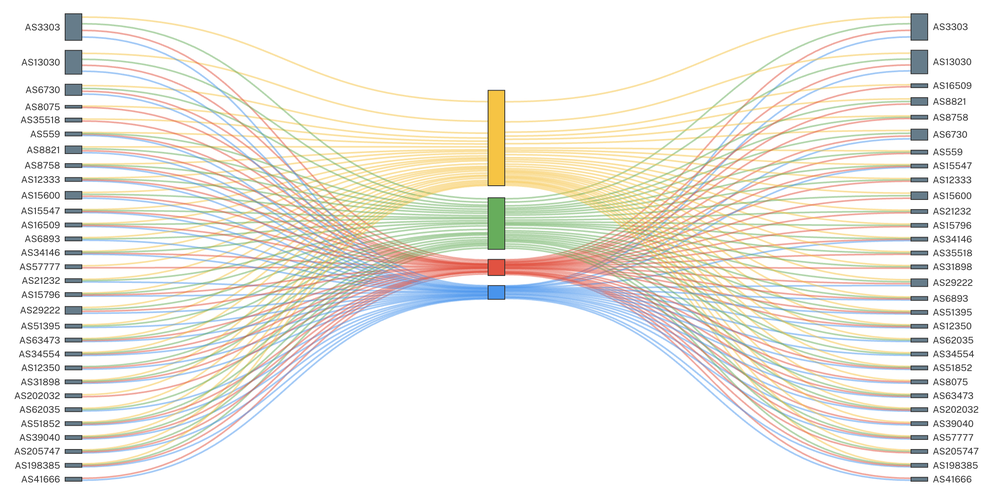
A Sankey diagram showing traffic flow from source ASNs through routing categories to destination ASNs. The width of each link is proportional to the number of paths, making it easy to identify which networks are well-peered locally and which are sending traffic out of region.

All three views share a consistent set of controls:
- Category legend: Paths are classified by IXP usage and geographic scope. With IXP data only enabled, paths fall into three categories: IXP, In-Region (green), IXP, Out-of-Region (blue), and No IXP (grey). With all location data enabled, the "No IXP" category splits further into No IXP, In-Region (amber) and No IXP, Out-of-Region (red), using additional geolocation sources to determine whether non-IXP paths stay local. Click any category to isolate it.
- Path filtering: Filter by ASN, IP address, IXP name, probe ID, or country code. Filters can be inverted to exclude specific paths.
- Shareable URLs: Every view state, including selected filters and individual traceroute paths, is encoded in the URL for easy sharing.
- Detailed traceroute popups: Every path can be inspected with a full traceroute table showing each hop's IP, hostname, ASN, RTT, IXP membership, and country - with direct links to RIPEstat and the underlying RIPE Atlas measurement.
A note on geolocation
Understanding where traffic goes is central to Region Meshes, and the reliability of that information matters.
By default, Region Meshes shows only IXP-based location data. This is the most reliable source of geographic information available for the analysis: when a hop is identified as belonging to an IXP, we can confidently place it at the IXP's known location. Combined with the known locations of RIPE Atlas probes themselves, this gives a trustworthy picture of which path the packets took.
For users who want to see the full routing path in more detail, the "IXP data only" toggle can be switched off to reveal all located hops. This uses additional geolocation sources including reverse DNS and IP geolocation databases. However, the reliability of these sources is highly variable (mostly because IP geolocation nowadays is focused on end users, not infrastructure), therefore a hop geolocated to one country may physically be in another. Paths shown in this mode should be interpreted with care and verified where possible. We are aware there is false information in this view - which is why this view is “opt-in”.
We are actively working to improve geolocation accuracy through enhancements to RIPE IPmap, our in-house IP geolocation system. Over the coming months, we expect the full-path view to become increasingly reliable as these improvements are integrated.
We want your feedback
Region Meshes is under active development, and your input shapes what we build next. Whether you have suggestions for new features, or have found something unexpected in the data, we would love to hear from you.
Go to the RIPE Atlas Use Case pages to start using Region Meshes today. Or jump right into the raw data.
Comments 0